
References
Cheatsheet
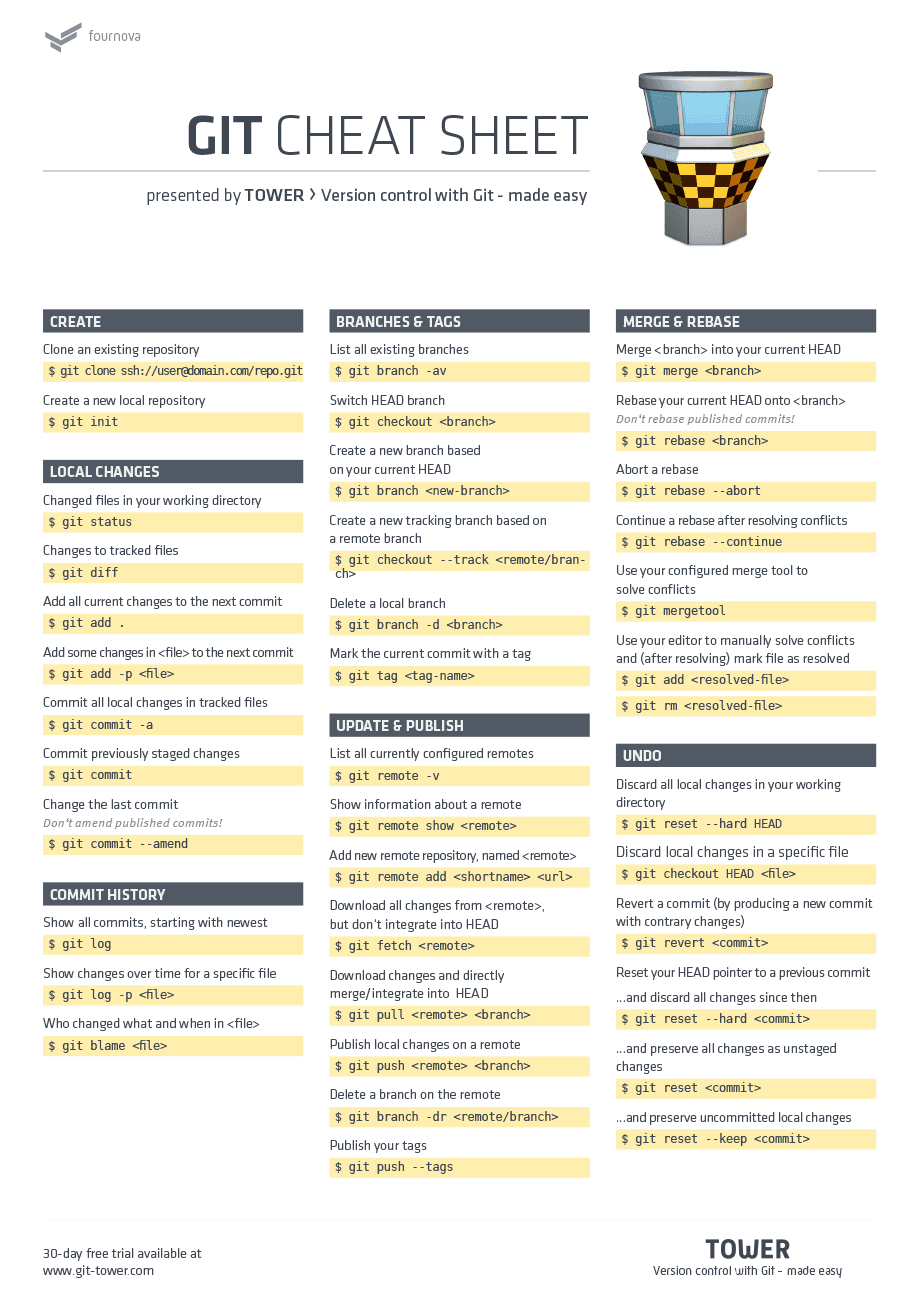
Git Command
git init
shell
// create a new repository on the command line
echo "# test" >> README.md
git init
git add README.md
git commit -m "first commit"
git branch -M main
git remote add origin git@github.com:JiyuShao/test.git
git push -u origin main

// …or push an existing repository from the command line
git remote add origin git@github.com:JiyuShao/test.git
git branch -M main
git push -u origin main
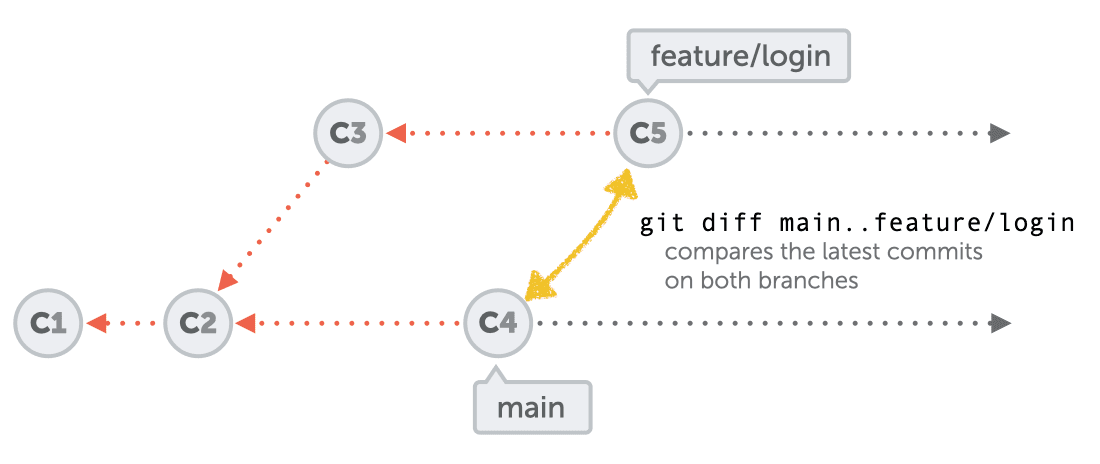
git diff
gitlab 中的 "Compare Revisions" 和 "Merge Requests Changes" 使用的是 "git diff origin/main...origin/branch" 方式, 见
bash
# 使用 .. 会真实的 diff 文件, main 和 branch 反过来不影响总的 diff 数量
git diff main..branch

# 这个是直接比较的 base commit 和 branch 之间 commit 的代码,
# 会存在即使文件已经相同, 但是因为 branch 有没有合并的 commit 的存在, 仍会显示有 diff
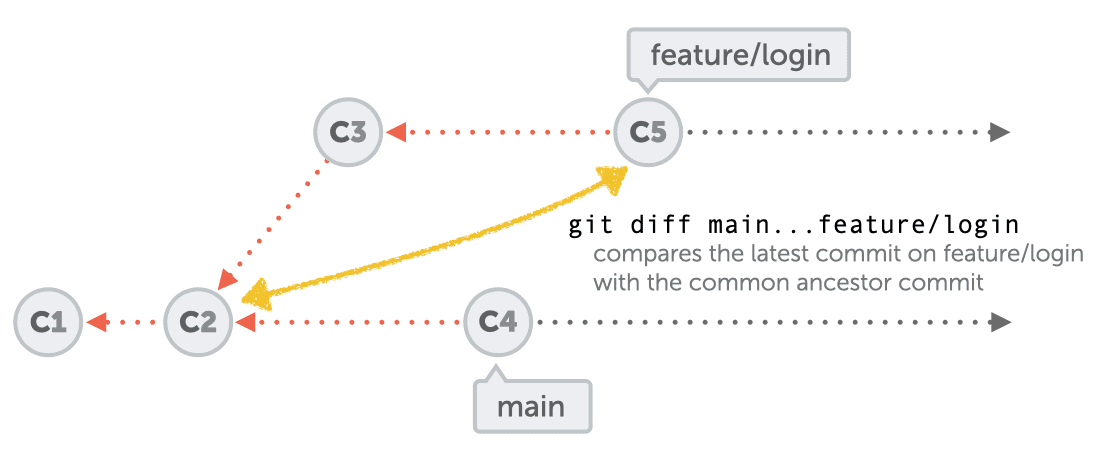
# 使用 ... 会忽略 main 的多余的 commit, 正反 diff 数量有可能
git diff main...branch
# 也可以使用自定义的 difftool
git difftool -d main...branch
# 同上可以直接获取到累计的 diff 结果, 包括 merge 解决冲突的代码等, 此时 ... 和 .. 效果一致
git difftool -d $(git merge-base main branch)..branch

# 使用下面的命令可以忽略 main 多余的 commit, 并且忽略 merge commit 的 diff,
# 并根据 commit 记录分别显示 diff, 缺点是不能获取累计的 diff(aka the diff is not cumulative)
# 如果在 merge 的时候更改了代码, 有可能造成代码的缺失, 因为忽略了 merge
git log --stat main..branch
git log --no-merges -p main..branch
配置 VSCode 为 git difftool 和 git mergetool
bash
git config --global merge.tool vscode
git config --global mergetool.vscode.cmd 'code --wait --new-window $MERGED'
git config --global diff.tool vscode
git config --global difftool.vscode.cmd 'code --wait --new-window --diff $LOCAL $REMOTE'
Clone a single folder from github
bash
# 1. Copy an empty repo
git clone --no-checkout https://github.com/supabase/supabase

# 2. Move into the empty repo
cd supabase

# 3. Initialize sparse-checkout
git sparse-checkout init --cone

#4. Checkout the folder
git sparse-checkout set examples/slack-clone-basic
Git submodule
bash
git submodule add git@gitlab.szzbmy.com:fe-template/plugin-secondary-development-game.git templates/component-game-demo
git submodule update --init --recursive
git submodule deinit --all
删除远程分支
bash
# 分支前加 :
git push origin :v1.1.0_20200811
删除远程没有的本地分支
bash
git fetch -p && git branch -vv | awk '/: gone]/{print $1}' | xargs git branch -D
Reset Commit
bash
# 重置上次提交
git reset --hard HEAD^
# 同步到远程(在远程删除上次 commit 记录)
git push -f
Git log
bash
# 只会按照 commit 继承链显示
git log

# 显示本地的操作记录
git reflog

# git log 按照 reflog 链显示
git log -g
git log --walk-reflogs
Reset commit
bash
git reset --soft COMMIT_ID
Cherry-pick
bash
# 使用场景
# 1,提交错分支
# 2,不小心把别人的代码合到了自己的开发分支,自己的开发分支需要重新创建,然后把需要的commit加过来

# 步骤
# 1,找到commit id,命令行不好看的可以用可视化工具SourceTree
git checkout commit所在分支
git log

# 2,切换到需要增加这些commit的分支
git checkout target_branch

# 3,cherry pick
git cherry-pick -X ignore-all-space commit_id1 commit_id2 commit_id3

# 如果commit比较多,且是连续的
# 不包含commit_id1
git cherry-pick -X ignore-all-space commit_id1..commit_id9
# 包含commit_id1
git cherry-pick -X ignore-all-space commit_id1^..commit_id9
Migrate a repository
bash
git clone https://USER@bitbucket.org/USER/PROJECT.git
cd PROJECT
git remote add upstream https://github.com:USER/PROJECT.git
git push upstream master
git push --tags upstream
Duplicating a repository
https://help.github.com/articles/duplicating-a-repository/
bash
git clone --bare https://github.com/exampleuser/old-repository.git

cd old-repository.git
git push --mirror https://github.com/exampleuser/new-repository.git
Git的4个阶段的撤销更改
bash
git fetch --all
git reset --hard origin/master
git pull origin master
git revert
bash
# -m 1 代表是以当前操作所在分支为主分支
git revert -m 1 88b226fd2c9e731a72f626a3ac44874e0f8a5db3
Stash
bash
git status
git stash --include-untracked
git stash show
git stash apply
git stash clear
Merge
bash
# Step 1. Update the repo and checkout the branch we are going to merge
git fetch origin
git checkout -b master origin/master

# Step 2. Merge the branch and push the changes to GitLab
git checkout test_tx
git merge --no-ff master
git push origin test_tx
Rebase
git rebase 是一个危险命令,因为它改变了历史,我们应该谨慎使用
bash
git checkout myFeature
git rebase master
git push origin --delete myFeature
git push origin myFeature
VS Code refresh git
bash
# -z 使用特殊格式打印 untracked file/directories
# -u: shows individual files in untracked directories
git status -z -u
> M  test?? test2?? test3%

# 获取当前分支的名字(不包括 ref/heads, 只有名字)
git symbolic-ref --short HEAD
> master

# 打印 master 最新的 commit
git rev-parse master
> 03ad65535875ddee018dd9bb6090eae209b59376

# 获取 master 上游的分支
git rev-parse --symbolic-full-name master@{u}
> refs/remotes/origin/master

# 对比需要上传和需要下载的 commit
git rev-list --left-right master...refs/remotes/origin/master
> <03ad65535875ddee018dd9bb6090eae209b59376
> >1d90652de053bc308f77fa201d4965bb91b37b72

# 打印所有的分支
git for-each-ref --format "%(refname) %(objectname)" --sort -committerdate
> refs/remotes/origin/master b280759e85a19cbcf723e38473247e5f996b99fd
> refs/remotes/origin/HEAD b280759e85a19cbcf723e38473247e5f996b99fd
> refs/heads/master b280759e85a19cbcf723e38473247e5f996b99fd

# 打印远程上传下载路径
git remote --verbose
> origin  git@github.com:JiyuShao/notebook.git (fetch)
> origin  git@github.com:JiyuShao/notebook.git (push)

# 获取当前 commit 模板
git config --get commit.template
^ vs ~
text
G   H   I   J
 \ /     \ /
  D   E   F
   \  |  / \
    \ | /   |
     \|/    |
      B     C
       \   /
        \ /
         A
A =      = A^0
B = A^   = A^1     = A~1
C = A^2  = A^2
D = A^^  = A^1^1   = A~2
E = B^2  = A^^2
F = B^3  = A^^3
G = A^^^ = A^1^1^1 = A~3
H = D^2  = B^^2    = A^^^2  = A~2^2
I = F^   = B^3^    = A^^3^
GIT 配置
代码换行符配置
git 配置:git config –global core.autocrlf input vscode 配置:设置搜索行尾符,改为
webstorm 配置:File | Settings | Editor | Code Style | Line separator,选择 Unix and macOS()
如果发现项目中突然修改了很多文件且不是自己改的,多半是换行符的问题,进入项目根目录,确保.prettierrc 文件有 “endOfLine”: “lf”,没有则加上,然后运行 npm run fix:prettier 即可修复。
打开 git 全局配置
bash
git config --global -e
在项目中规范 git commit
bash
npm i -g commitizen

npm i -D @commitlint/cli @commitlint/config-conventional

#进入项目目录
commitizen init cz-conventional-changelog --save --save-exact

#提交 commit
git cz
SVN
Common SVN command
text
svn status
# check current changes
svn add --force .
# add file
svn status | grep '^!' | awk '{print $2}' | xargs svn delete
# delete missing file
svn commit -m 'test'
#commit
Discussion
留言与讨论
想法、补充和不同意见都欢迎。